

Fragmented workflows, manual handoffs, and siloed systems cost businesses more than time. They create inconsistency, kill accountability, and make scaling nearly impossible. This end to end process automation guide gives you a practical roadmap for moving from disconnected manual processes to fully orchestrated workflows that run with precision. You will learn how to prepare your organization, design and execute automation with the right balance of technology and human oversight, avoid the mistakes that derail most projects, and measure outcomes that actually matter to your bottom line.
Table of Contents
- Key takeaways
- What this end to end process automation guide covers first: preparation
- Executing your automation workflow step by step
- Common pitfalls and how to avoid them
- Measuring success in process automation
- My honest take on why most automation projects stall
- How Ejmediaco helps you automate end to end
- FAQ
Key takeaways
| Point | Details |
|---|---|
| Start with process discovery | Use event logs and data audits to map real workflows before writing a single automation rule. |
| Design for human exceptions | Plan for roughly 80% automation and 20% human review to keep workflows resilient under edge cases. |
| Choose pilots strategically | Select a first automation project that balances meaningful business impact with manageable complexity. |
| Monitor from day one | Build dashboards and error management into the workflow from the start, not as an afterthought. |
| Measure cycle efficiency | Track process cycle efficiency and velocity, not just hours saved, to prove real business value. |
What this end to end process automation guide covers first: preparation
Most automation projects fail before a single workflow is configured. The failure happens in the preparation phase, or more precisely, in skipping it entirely.
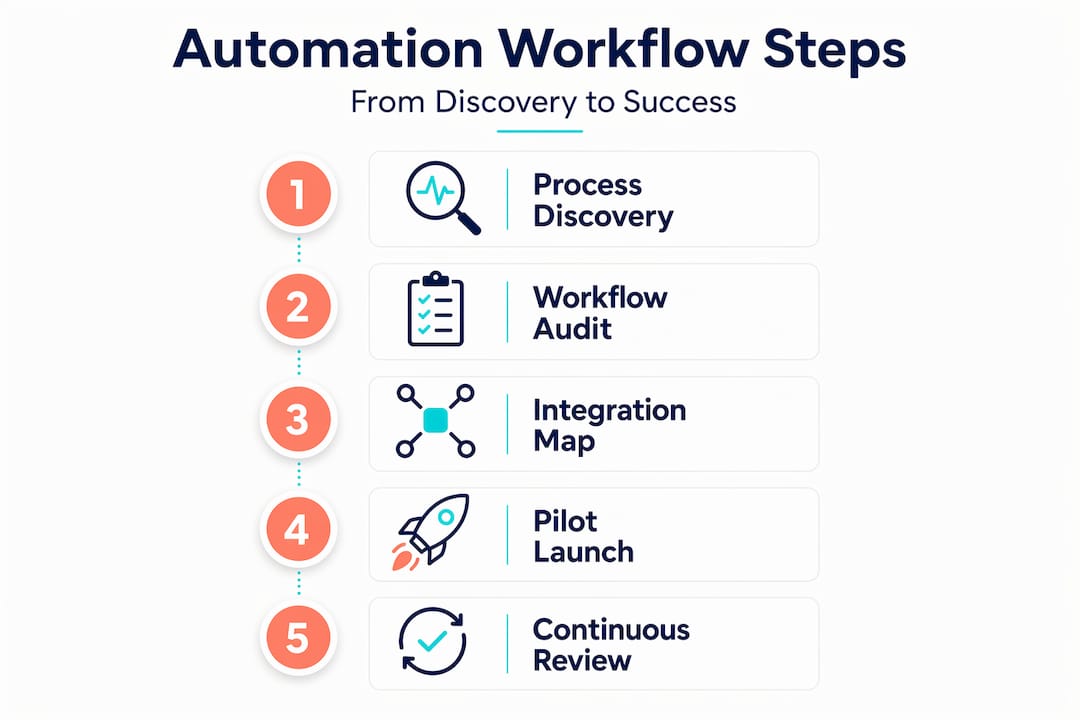
Process discovery is critical; skipping it is the single biggest contributor to automation failure in enterprises. The reason is straightforward. Managers describe how they believe processes work. What actually happens in practice, captured in system event logs and transaction data, often looks completely different. Interviews give you the official version. Data gives you the real one.

Audit your workflows with data, not opinions
Start by pulling event logs from your existing systems. These logs reveal actual process paths, including the detours, workarounds, and exceptions your team has normalized over time. Auditing with event logs to reveal bottlenecks and deviations is the foundation of Appian's five-step enterprise automation framework, and it works because data does not have political motivations.
Once you have your process maps, identify the white spaces. These are the gaps between systems where work gets handed off manually, usually through email, spreadsheets, or verbal communication. Those white spaces are where automation delivers the most immediate return.
Build your integration inventory
Before selecting any tools, document every system your business currently uses and how they connect. Note which connections are automated, which are manual, and which have no connection at all. This inventory becomes your integration roadmap.
| Assessment area | What to document | Why it matters |
|---|---|---|
| Current systems | All software platforms in use | Identifies integration points and gaps |
| Manual handoffs | Steps done by email or spreadsheet | Reveals highest-priority automation targets |
| Data formats | How data is structured across systems | Flags transformation requirements upfront |
| Compliance requirements | Audit trails, approvals, retention rules | Shapes governance and documentation design |
Pro Tip: Pick your first automation pilot using a "Goldilocks" test. The process should be repetitive enough to justify automation, complex enough to demonstrate real value, and simple enough that you can complete it within 60 to 90 days. Too ambitious and you stall. Too trivial and nobody cares.
Set clear, measurable objectives before you touch any tooling. Define what success looks like in numbers: cycle time reduction, error rate decrease, or cost per transaction. Without a baseline, you cannot prove the automation worked.
Executing your automation workflow step by step
With your process maps and integration inventory in hand, you are ready to build. Process automation coordinates tasks, decisions, and system interactions within workflows using rules and logic to improve execution reliability. That definition matters because it frames automation correctly: it is a coordination layer, not just a task replacer.
A practical execution model follows five stages:
-
Trigger. Define the event that starts the workflow. This could be a form submission, a new record in your CRM, an incoming email, or a scheduled time. Be specific. Vague triggers create inconsistent behavior.
-
Connection. Establish the integration between systems involved in the process. Celigo's five-stage model frames connection as a distinct phase because integration failures are the most common source of workflow breakdowns.
-
Transformation. Map and convert data between systems. A customer record in your CRM may store a phone number differently than your billing platform expects it. Data transformation handles that translation. Neglecting this stage causes failures even when the workflow logic is technically correct.
-
Execute. Run the workflow logic, including conditional branches, approvals, and notifications. This is where you configure the rules that determine what happens under different conditions.
-
Monitor and optimize. Build dashboards that show workflow performance from the first day of deployment. Platform-level error management and AI-powered issue classification are now standard in mature automation platforms, and you should use them.
Designing for human exceptions
One of the most common mistakes in implementing process automation is aiming for 100% automation. Human-in-the-loop design targets roughly 80% automation with 20% human exception handling, and that ratio exists for good reason. Some decisions require judgment. Some data is ambiguous. Some approvals carry legal weight.
Plan upfront which cases require human review. Design explicit handoff protocols so that when the automation flags an exception, the right person receives it with full context and a clear action required. Workflows that dump exceptions into a generic inbox get ignored.
Governance from the start
Governance frameworks prevent shadow automation and the technical debt that accumulates when teams build their own workarounds outside the official system. Establish an automation center of excellence, even a small one, that owns standards for how workflows are built, documented, and maintained. This pays dividends when you scale beyond your first pilot.
Modern end-to-end automation platforms combine business process management, robotic process automation, AI agents, and integration tools under a unified system. These Business Orchestration and Automation Technologies, or BOAT platforms, reduce the complexity of managing multiple point solutions and give you a single place to monitor end-to-end process health.
Common pitfalls and how to avoid them
Even well-planned automation projects run into trouble. The issues are predictable, which means they are also preventable.
Over-automation without human review. When you remove all human checkpoints from a process, errors propagate without correction. A single bad data record can corrupt hundreds of downstream records before anyone notices. Keep your 20% exception handling in place and review it regularly.
Weak integration contracts. Data mapping and validation rules must be explicit and tested. If your automation assumes a field will always contain a value and that field is sometimes blank, the workflow breaks. Build validation logic that catches bad data at the point of entry, not after it has traveled through three systems.
Skipping monitoring design. Teams often treat monitoring as something to add later. It never gets added. Build your error dashboards and alerting rules before you go live. Define who receives alerts, what the escalation path looks like, and how quickly issues must be resolved.
Losing the audit trail. ISO 9001 compliance requires detailed documentation of process inputs, outputs, controls, and responsibilities. Automation programs must preserve process interfaces and evidence for compliance. Pre-plan which logs and artifacts your automation generates and confirm they satisfy your audit requirements.
Treat your automation as an accountability layer. Every decision the system makes should be traceable, explainable, and reviewable. If you cannot answer "why did the system do that?" for any given transaction, your governance design needs work.
Measuring the wrong things. Hours saved is a comfortable metric because it is easy to calculate. It is also a shallow one. The real question is whether your processes are faster, more reliable, and more consistent than they were before.
Measuring success in process automation
Once your automation is live, the measurement framework you use determines whether you can prove value and justify further investment.
Tracking process cycle efficiency as a ratio of value-added time to total process time reveals what automation actually accomplished. A process that takes 10 hours but only 45 minutes of that time adds value has a cycle efficiency of 7.5%. Automation that reduces the total time to 2 hours while keeping the value-added work at 45 minutes raises that ratio to 37.5%. That is a number worth showing to a board.
Beyond cycle efficiency, track these indicators:
- Error rate per transaction. Automation should reduce errors, not just speed things up. If error rates stay flat, your data transformation or validation logic needs attention.
- Process velocity. How many transactions does the workflow complete per day or per week? Velocity shows throughput improvements that cycle time alone misses.
- Exception rate. If more than 30% of transactions require human intervention, your automation rules are not capturing enough of the real-world variation in your process.
- System uptime and SLA compliance. Automated workflows that go down during business hours cost more than the manual process they replaced.
Run a formal automation audit every quarter. Review your dashboards, check your exception logs, and ask whether the governance rules still fit the process as it actually runs today.
My honest take on why most automation projects stall
I have watched organizations invest months in selecting tools, building business cases, and getting stakeholder buy-in, only to see their automation project collapse six months after go-live. The technology was fine. The process design was the problem.
In my experience, the teams that succeed treat discovery as a non-negotiable investment. They spend real time with event logs, they map the exceptions and edge cases that nobody talks about in meetings, and they design their workflows around what actually happens, not what the process documentation says should happen. The teams that fail skip this work because it feels slow and unglamorous. They pay for it later.
I also think the human-in-the-loop conversation gets framed wrong. Most leaders hear "20% human handling" and think it represents a failure to automate fully. I see it as a resilience strategy. The 20% is where your team catches the things the system cannot, and it is where your people stay engaged with the process rather than becoming passive monitors of a black box.
The other thing I keep coming back to is culture. Governance frameworks and automation centers of excellence only work if the people involved believe automation is something being done with them, not to them. The best implementations I have seen involve frontline staff in the design process from the beginning. They know where the real exceptions live. They will tell you, if you ask.
— Ethan
How Ejmediaco helps you automate end to end
Building a complete automation system requires more than workflow software. It requires the right architecture connecting your website, your CRM, and your customer-facing touchpoints into a single operating system. Ejmediaco does exactly that.
Their AI receptionist service handles inbound calls, qualifies leads, and books appointments around the clock, acting as the human-in-the-loop layer for your customer communication workflows. No missed calls. No gaps in coverage. For businesses that rely on phone-based lead capture, this closes one of the most expensive white spaces in the sales process.
On the back end, Ejmediaco builds custom CRM systems designed around your actual sales process, not a generic template. These CRMs serve as the orchestration layer that connects your marketing, sales, and operations workflows into a single, trackable system. If you are ready to move from fragmented tools to a unified automation platform, Ejmediaco is worth a conversation.
FAQ
What is end-to-end process automation?
End-to-end process automation connects every step of a business workflow, from trigger to outcome, using software rules and integrations to reduce manual work and improve consistency. It coordinates tasks, decisions, and system interactions across the full process lifecycle.
How do I start automating business processes?
Start with a data-driven audit of your current workflows using system event logs, not interviews alone. Identify the highest-impact manual handoffs, set measurable objectives, and select a pilot process that balances complexity with achievable results within 60 to 90 days.
What tools are used for end-to-end automation?
Modern end-to-end automation relies on platforms that combine business process management, robotic process automation, AI agents, and integration tools. BOAT platforms, which stands for Business Orchestration and Automation Technologies, bring these capabilities under a single system to reduce complexity and improve visibility.
How do you measure the success of process automation?
Track process cycle efficiency, which is the ratio of value-added time to total process time, alongside error rates, process velocity, and exception rates. Hours saved alone is not a sufficient measure of automation success.
What is human-in-the-loop automation?
Human-in-the-loop automation reserves roughly 20% of workflow cases for human review, handling exceptions, approvals, and ambiguous data that automated rules cannot reliably resolve. This design improves resilience and keeps accountability intact across the full workflow.