

Workflow automation is one of those terms that gets thrown around constantly, yet most professionals still picture it as either a simple email auto-responder or a sci-fi robot replacing entire departments. Neither is accurate. What is workflow automation, really? It's the practice of using software to execute a defined series of business tasks automatically, triggered by events and governed by rules, so your team stops doing the same repetitive steps by hand. Understanding this correctly changes how you think about growth, efficiency, and where your people should actually be spending their time.
Table of Contents
- Key takeaways
- What is workflow automation, exactly?
- How workflow automation works in practice
- The real benefits of workflow automation
- Workflow automation vs. RPA vs. BPA
- Workflow automation tools worth knowing
- My take on where most businesses go wrong
- How Ejmediaco puts this into practice for you
- FAQ
Key takeaways
| Point | Details |
|---|---|
| Automation runs on triggers and rules | Every workflow starts with a trigger event and follows defined conditions to complete actions without manual input. |
| Start small, then scale | Beginning with one specific workflow reduces errors and makes the logic easier to maintain and improve. |
| Benefits go beyond speed | Workflow automation reduces errors, improves compliance, and frees your team for work that actually requires judgment. |
| Tools are accessible to non-technical users | No-code and low-code platforms let business owners build and modify workflows without writing a single line of code. |
| Human oversight still matters | The best automated workflows include exception handling that routes edge cases to a real person for review. |
What is workflow automation, exactly?
The workflow automation definition, stripped of jargon, is this: software automatically completes a sequence of tasks based on a set of predetermined triggers, conditions, and actions. You define the rules once. The system follows them every time, without needing a reminder, a follow-up email, or a manager checking in.
Workflow automation uses software to automate a series of repetitive, manual steps triggered by events and executed with specific rules and actions. The core building blocks are:
- Trigger: The event that starts the workflow. A new form submission, an invoice reaching a certain amount, or a customer status changing.
- Conditions/Rules: The logic that determines what happens next. "If the deal value is over $10,000, route to senior sales rep."
- Actions: What the system actually does. Send an email, create a task, update a record, notify a team member.
- Branching logic: Different paths the workflow can take based on conditions. Think of it as the "if/then" decision tree your process follows.
A practical example: a client submits a contact form on your website. The trigger fires. The system checks the service type they selected (condition). It assigns the lead to the right team member, sends a confirmation email to the client, and creates a follow-up task in your CRM, all within seconds, with no human touching it.
Pro Tip: Before building any workflow, write it out in plain language first. "When X happens, if Y is true, do Z." If you can't explain it simply, the automation will be fragile.
It's worth separating workflow automation from broader business process automation (BPA). Workflow automation focuses on task-level routing, approvals, and notifications, while BPA spans entire end-to-end processes across departments and systems. Think of workflow automation as one floor of a building. BPA is the whole building.
How workflow automation works in practice
Understanding workflow automation conceptually is one thing. Knowing how it actually gets built and deployed is what separates teams that succeed with it from those who give up after the first broken flow.
The typical development lifecycle follows three phases:
- Plan. Map the workflow in detail before touching any software. Identify the trigger, the expected path, every condition that changes the path, and the end state. Also document what happens when something goes wrong. Missing data, an unrecognized input, a third-party system being offline. Effective planning to map triggers and exceptions before deployment is what separates workflows that hold up under real conditions from ones that quietly fail.
- Build. Use your chosen platform to construct the logic. Start with the simplest version of the workflow. One trigger, one action, one condition. Add complexity only after the core path works correctly. Starting with a specific workflow and clear endpoints reduces errors and prevents brittle automation logic.
- Deploy and monitor. Launch the workflow and watch it. Check for exceptions, failed steps, and unexpected outputs. Set up alerts so you know when something breaks rather than discovering it three weeks later when a client complains.
Real-world examples of workflow automation in action include ticket routing in customer support (a new support request gets tagged by category and assigned to the right agent automatically), employee onboarding (a new hire record triggers a sequence of IT provisioning, welcome emails, and training task assignments), and invoice approvals (invoices above a threshold get routed to a finance manager while smaller ones auto-approve).
Pro Tip: Never automate a process you haven't done manually at least a few times. If you don't understand the edge cases from experience, your automation will miss them entirely.

The real benefits of workflow automation
The benefits of workflow automation are well-documented, but the ones that matter most to business owners go deeper than "saves time."
- Fewer errors. Manual processes depend on people remembering steps, copying data correctly, and not getting distracted. Automation eliminates variability, ensuring tasks follow the same rules every single time.
- Faster throughput. Tasks that previously waited in someone's inbox for hours or days now complete in seconds. This compounds across dozens of workflows running simultaneously.
- Compliance and auditability. Reliable workflow automation strengthens auditability by codifying processes that route steps properly and manage exceptions. Every action is logged, timestamped, and traceable.
- Scalability without headcount. You can handle twice the volume of leads, orders, or support tickets without doubling your team.
- Employee focus. Your people stop doing data entry and start doing work that requires actual judgment, creativity, and relationships.
"The goal of automation is not to replace people. It's to stop wasting them on tasks a rule can handle."
Microsoft highlights time savings and fewer mistakes as primary workflow automation benefits, while the broader business impact is that teams can redirect their energy toward the work that actually drives revenue. That's why workflow automation improves team output in ways that simply hiring more people cannot replicate.
Workflow automation vs. RPA vs. BPA
These three terms get confused constantly, and mixing them up leads to choosing the wrong tool for the job.
| Concept | What it does | Best used for |
|---|---|---|
| Workflow Automation | Coordinates task sequences with triggers, rules, and human approvals | Process coordination across systems and teams |
| Robotic Process Automation (RPA) | Mimics user actions in a UI to automate repetitive screen-based tasks | Legacy systems without APIs or direct integrations |
| Business Process Automation (BPA) | Automates entire end-to-end business processes across departments | Organization-wide process transformation |
Workflow automation coordinates sequences with triggers and rules, including human approvals, while RPA automates UI-level tasks by mimicking user actions. The practical distinction: use workflow automation when your systems can communicate through integrations. Use RPA when you're dealing with a legacy system that has no API and someone literally has to click through screens to get data out.
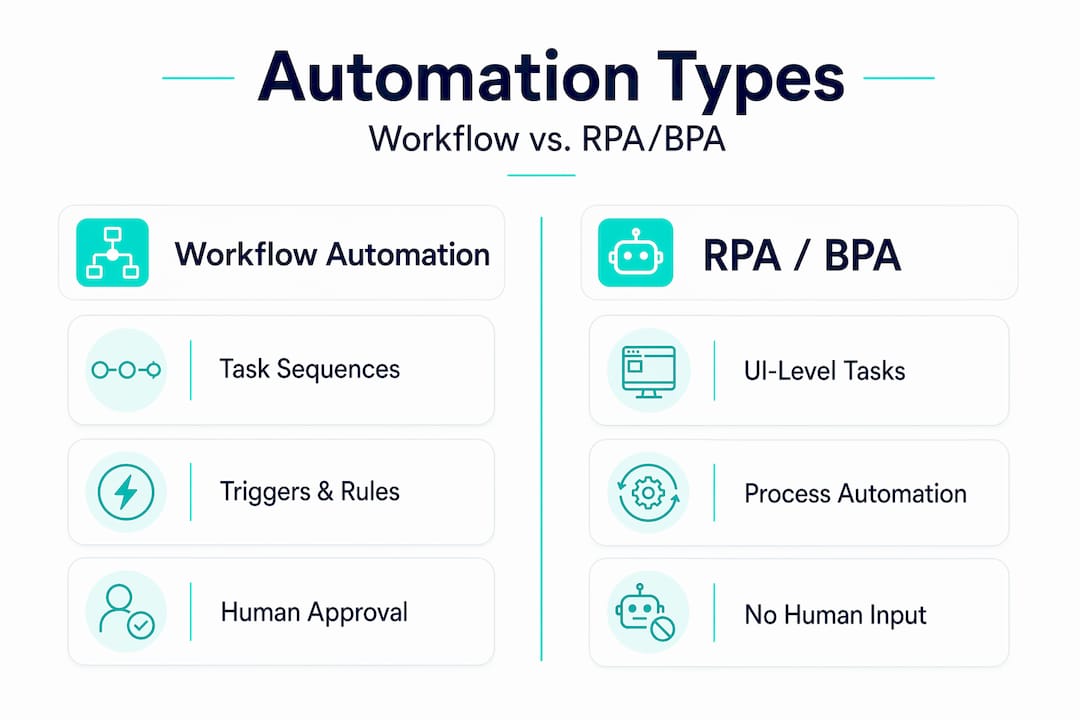
Deciding between unattended and attended automation is also strategic. Fully automated (unattended) workflows run without human involvement. Attended workflows pause for human input at defined steps. The right choice depends on your risk tolerance and the complexity of the decisions involved.
Workflow automation tools worth knowing
The workflow automation tools market has matured significantly. You no longer need a developer to build functional automations for most business use cases.
- Drag-and-drop builders. Most modern platforms let you visually connect triggers and actions without writing code. No-code platforms enable non-technical users to create workflows connecting apps and automating tasks with minimal handoffs.
- Pre-built templates. Platforms offer libraries of common workflow patterns. Lead routing, invoice approvals, customer onboarding sequences. You modify them rather than starting from scratch.
- Native integrations. The best tools connect directly to the software you already use. Your CRM, email platform, accounting software, and project management tools should all be connectable without custom code.
- AI-assisted steps. AI steps in workflow automation work best as components inside deterministic workflows, not as the decision-maker. An AI might classify an incoming support ticket, but a rule-based step decides where it goes.
- Monitoring and alerting. Any tool worth using gives you visibility into what's running, what's failing, and why. Blind automation is dangerous automation.
When evaluating workflow automation tools, prioritize integration depth over feature count. A platform that connects cleanly to your existing stack will deliver more value than one with hundreds of features that don't talk to your actual systems.
My take on where most businesses go wrong
I've watched a lot of teams approach workflow automation with the best intentions and still end up with a mess of broken flows six months later. The pattern is almost always the same. They automate too much, too fast, without thinking through what happens when things don't go as expected.
The most reliable automations I've seen start with one workflow written in plain language, where someone actually sat down and thought through the trigger, the approval steps, the failure scenarios, and the end state before opening any software. Writing workflows in plain language focusing on triggers, approvals, failures, and end states is what creates processes that are maintainable a year later.
The second mistake I see constantly is treating automation as a set-and-forget system. Human-in-the-loop design for exceptions and data quality issues is not optional. It's what prevents a small error from silently corrupting hundreds of records before anyone notices.
My honest advice: automate the boring, repetitive steps first. The ones where a human adds no real value and just creates delay. Get those running cleanly. Then expand. Automation should make your team faster and more confident, not anxious about what the system might be doing wrong behind the scenes.
— Ethan
How Ejmediaco puts this into practice for you
If you're ready to move from understanding workflow automation to actually running it in your business, Ejmediaco builds the systems that make it real. Their AI receptionist handles inbound calls, qualifies leads, and books appointments around the clock, so your sales process never stops because someone's unavailable. That's workflow automation applied directly to your revenue pipeline.
Ejmediaco also builds custom CRM systems designed around your actual sales process, not a generic template. Every stage, trigger, and follow-up sequence is built to match how your team works. The result is a system your people actually use, because it fits the way deals actually move. You can explore the full growth stack at Ejmediaco to see how websites, AI voice agents, and CRMs work together as one connected system.
FAQ
What is the workflow automation definition in simple terms?
Workflow automation is the use of software to automatically complete a sequence of business tasks based on predefined triggers, rules, and conditions, removing the need for manual intervention on repetitive steps.
How does workflow automation work?
A trigger event starts the workflow, conditions determine which path the process follows, and actions are executed automatically. The system runs the same logic every time, consistently and without human input.
What are the main benefits of workflow automation?
The core benefits include fewer manual errors, faster task completion, improved compliance through logged and traceable actions, and the ability to scale operations without proportionally increasing headcount.
How is workflow automation different from RPA?
Workflow automation coordinates task sequences across systems using triggers and rules, often including human approval steps. RPA mimics user actions in a software interface and is better suited for legacy systems that lack direct integrations.
What are some practical examples of workflow automation?
Common examples include lead routing from a web form to the right sales rep, automated invoice approval based on dollar thresholds, employee onboarding task sequences, and customer support ticket assignment by category.